
A single software application cannot serve as the universal source of truth for a growing service business because commercial billing, daily dispatch, and on-site field execution operate on completely different rhythms.
Trying to force every scrap of operational detail into the CRM usually guarantees the creation of shadow spreadsheets within thirty days.
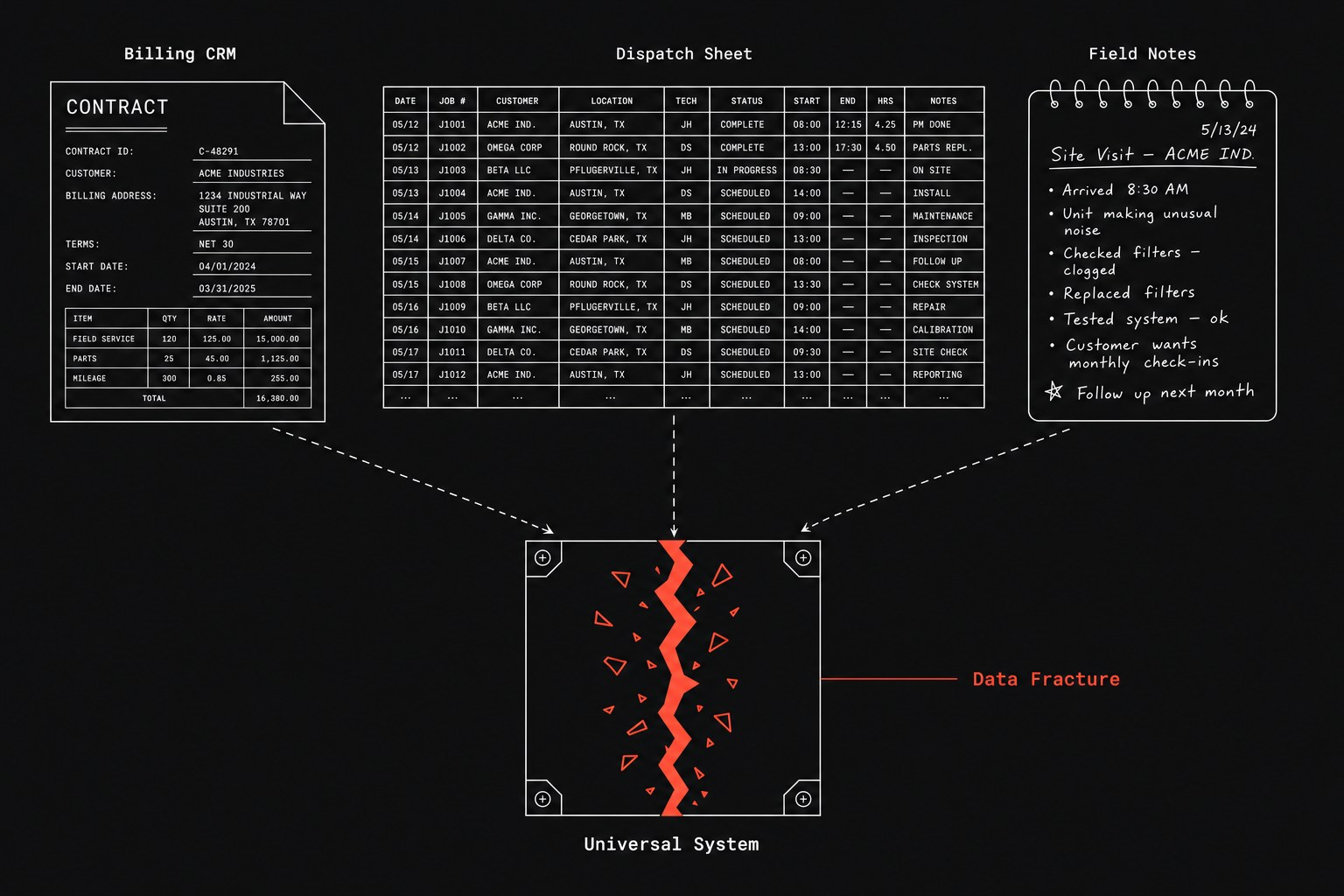
When leadership discovers that client records conflict across departments, the default reaction is to mandate total database compliance. Management announces that if work is not logged directly inside the CRM, that work did not happen. Meanwhile, dispatchers keep their private scheduling tabs open, and technicians continue texting photos and model numbers to each other because the official interface requires too many clicks on a mobile phone. This conflict stems from a core architecture error: treating every record as equal instead of assigning explicit domain ownership to specific tools.
When your stack suffers from disconnected tools without shared events, staff members create local workarounds to survive the workday. The resulting drag forces coordinators into constant reconciliation loops, which makes it hard to quantify manual tax in your operations until billing errors spike. To fix data divergence, you do not need to force everyone into one interface. You need to define which tool owns which operational facts, and then automate the handoff (work leaving one person or system so another can continue).
The three competing sources of operational truth
In a service company with 20 to 200 people, information naturally gathers across three separate surfaces. Each surface exists because it solves an immediate operational speed requirement that the other tools ignore.
- The CRM. This is your system of record (the official tool that is supposed to hold the truth) for commercial relationships. It tracks billing entities, signed service agreements, contact hierarchies, payment terms, and lifetime revenue.
- The Dispatch Spreadsheet. This is the operational staging buffer. Dispatchers rely on it because they need to reassign eight jobs in two minutes when a technician calls out, an action that requires dozen page reloads inside a standard CRM.
- The Technician's Field Notes. This is the physical reality on the ground. It contains serial numbers written on cardboard boxes, photos of corroded valves, and quick text messages explaining that the gate code on the job sheet was wrong.
Operational breakdowns happen when management forces one of these layers to handle the duties of the other two. When you evaluate where information should live, consider how each medium behaves under daily operational pressure:
| Storage Layer | Primary Purpose | Best-Suited Data | Operational Blind Spot |
|---|---|---|---|
| CRM | Commercial history and account state | Master billing terms, client contacts, contract status, rate cards | Cannot capture rapid, unformatted field observations without heavy friction. |
| Dispatch Sheet | Real-time scheduling buffer | Daily crew routes, temporary reassignments, truck availability | Lacks field validation, breaks version history easily, and leaves no audit trail for billing. |
| Field Notes | Physical execution capture | Asset serial numbers, job site photos, immediate parts needed, access notes | Trapped in text threads or personal notes where back-office accounting cannot see it. |
Why the single-tool mandate backfires
Most service firms try to solve discrepancies by choosing the CRM and outlawing everything else. Coordinators often say, "Just put the gate code in the account notes," or "Make sure the technician selects the valve model from the dropdown before closing the ticket."
That policy ignores how physical work actually gets done. A technician wearing work gloves in a utility room will not navigate five nested dropdown menus to report a replacement part. They will write "replaced bad 2in valve" in a free-text box or text the service manager. If the software blocks them from closing the ticket without filling mandatory dropdowns, they select the first option on the list just to submit the form.
The result is dirty data masquerading as compliance. Back-office teams think they have accurate records, but the database is filled with dummy entries, while the real information lives in text threads. When accounting prepares the monthly invoice, they have to call the technician anyway to ask, "Did you install the standard bracket or the heavy-duty one?" This breakdown creates an endless cycle of copy-paste CRM spreadsheet operations that wastes hours every week.
Establishing strict domain ownership
The fix is not software consolidation, but domain boundaries. Each operational fact should have exactly one authoritative owner based on who creates the data and who relies on it next.
- Account identity and billing rules belong exclusively to the CRM. Only account managers and billing coordinators may change client contact details, rate agreements, and payment terms.
- Schedule adjustments belong to the dispatch board. Whether that board is a dedicated dispatch screen or an operational grid, it owns the temporary sequence of work for the current week.
- Equipment status and site conditions belong to field capture tools. Technicians own the physical facts: equipment serials, parts consumed, arrival timestamps, and site photos.
Under this model, the technician never touches billing terms, and the salesperson never edits field equipment logs. When a technician discovers that a gate code has changed, they record it in their mobile completion form. An automated workflow then updates the master CRM record without requiring a dispatcher to copy and paste the text.
How to coordinate data handoffs without double entry
Once domain ownership is clear, the operational goal is moving facts between systems without manual retyping. You do not need complex enterprise service architectures to keep three tools aligned.
Field Capture (Photos & Serials)
  → Structured Mobile Form
  → Automated Event Trigger
  → CRM Master Asset Record & Accounting Draft
A field technician captures the serial number using a lightweight form or voice memo. The system extracts the structured values, verifies them against the scheduled work order ID, and pushes the updated asset details directly into the CRM account. The dispatcher sees the job status change to completed on their board instantly, while billing receives a draft invoice with the exact line items attached.
Nobody retyped the serial number. The dispatcher never had to open the CRM, and the technician never had to view an accounting screen.
When not to split your data across systems
Do not build multi-system domain rules if your team is under ten people and works out of a single room. When one coordinator handles all dispatching and invoicing while talking directly to three technicians, a shared spreadsheet or a basic out-of-the-box field service app is sufficient. Adding automated synchronization across separate tools introduces maintenance overhead that small teams cannot justify.
Similarly, if your business delivers purely digital services with no physical job sites, truck rolls, or physical equipment, you do not need mobile field capture workflows. A standard CRM with disciplined stage gates will handle your handoffs cleanly.
Next step
If your coordinators spend hours each week cross-checking spreadsheets against CRM records and deciphering text messages to send accurate invoices, you have an architecture problem rather than a personnel issue. Flaux provides an operational AI assessment that maps your handoffs, locates where data diverges, and outlines the exact synchronization rules your business needs.