
Choosing between Zapier and n8n comes down to whether your operations team needs rapid point-to-point connections for isolated tasks or deterministic control over client delivery workflows that cannot fail quietly.
For a 20 to 200 person service company, automation handles the handoff (work leaving one person or system so another can continue) between sales, billing, project setup, and client communication. When a handoff drops silently, an account manager spends two hours digging through notifications to figure out why an onboarding portal never created the client folder or why a retainer invoice was missed. That operational drag is what we examine when comparing these two platforms.
The architectural gap: linear triggers vs execution graphs
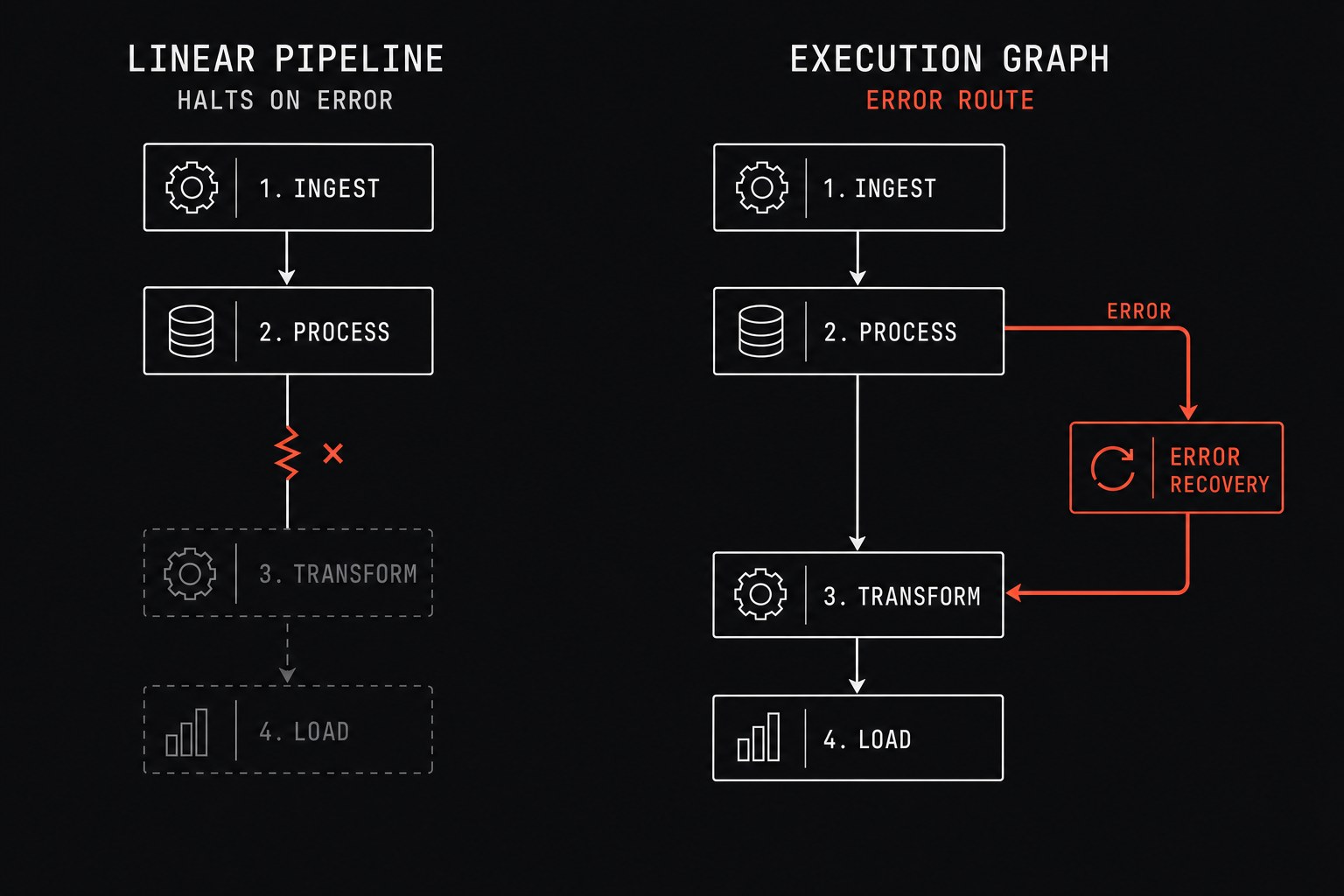
Zapier is built around linear trigger-action pairs. An event occurs in your form builder, Zapier catches the payload, runs through a sequence of steps, and updates your system of record (the official tool that is supposed to hold the truth, like your CRM or project database). If you need conditional branching, Zapier provides Paths, but complex logic quickly splinters into multiple nested rules or separate helper automations.
Total monthly task runs = Client onboarding events × Steps per workflowWhen multi-step automations multiply, Zapier accounts often suffer from fragmented visibility. If step four in a seven-step sequence hits an API rate limit or returns an unexpected null value, the workflow halts mid-execution. You can read more about diagnosing these hidden bottlenecks in our breakdown of silent automation failures.
n8n uses a node-based execution graph. Instead of passing flat key-value pairs through a rigid linear pipeline, every node outputs structured arrays of data items that you can split, merge, loop, or transform using JavaScript expressions. More importantly, n8n treats error routing as a native component of workflow design. You can attach dedicated error trigger workflows that catch failures across any execution, log the exact input payload, notify your operations channel in Slack, and route the failed job into a retry queue automatically.
Operational comparison table
The following matrix compares how each tool behaves across the core functional areas of an SMB operations department.
| Operational Area | Zapier | n8n |
|---|---|---|
| Primary Design Model | Linear trigger-action chains with optional Paths | Node-based directed execution graph with loops and branches |
| Error Handling | Generic email alerts; manual task replay on paid tiers | Dedicated error-trigger workflows, per-node fallback paths, custom retry logic |
| Data Transformation | Built-in formatter steps (each counts as a billed task) | Native JavaScript/Python code nodes and JMESPath expressions at zero extra step cost |
| Hosting & Data Control | Cloud-only SaaS; data passes through vendor infrastructure | Cloud-hosted SaaS or self-hosted on your own Virtual Private Server (VPS) |
| Pricing Model | Tiered by total task count across all automations | Tiered by workflow executions (Cloud) or server capacity (Self-Hosted) |
| Team Hand-Off Speed | Fast for non-technical coordinators building simple alerts | Requires basic understanding of JSON structures and data arrays |
The true total cost of ownership
A common misconception is that n8n is free simply because its source code is available to self-host. For an operations team managing client commitments, self-hosting introduces server maintenance, version upgrades, database backups, and queue monitoring.
Annual hosting overhead = Server infrastructure fees + Maintenance engineering hoursIf your company does not have an in-house engineer to maintain a Docker instance or manage a PostgreSQL database, running self-hosted n8n creates a single point of failure on whoever set up the server. In that scenario, n8n Cloud or a fully managed instance is the appropriate baseline for comparison.
Zapier's cost scales directly with task volume. If you build a workflow that processes 50 line items on a vendor invoice and runs three formatting steps per item, a single execution can consume 150 tasks. On n8n, that same run processes the entire 50-item array in a single execution node without multiplying the operational bill.
When to stay on Zapier
Do not migrate off Zapier just because another platform offers more engineering levers. Zapier remains the better choice under specific operational conditions:
- Your team consists entirely of non-technical coordinators who need to connect basic tools without touching JSON or data transformation logic.
- Your automations are shallow: "When a Calendly meeting is booked, create a row in Google Sheets and post a message to Slack."
- Your monthly volume is steady and predictable, keeping you comfortably within your current plan tier.
- You rely on niche SaaS products whose custom APIs do not exist in open ecosystems but have pre-built integrations in Zapier's catalog.
If someone on your team frequently asks "Can we just connect tool A to tool B by 2:00 PM today without writing any code?", Zapier is the correct utility for that request.
When to move to n8n
The transition to n8n becomes necessary when the complexity of your core service delivery exceeds Zapier's linear model:
- Nested handoffs require complex state: You need to fetch a list of client deliverables, loop over each item to check its status in a project tool, update only overdue records, and compile a single summary digest email.
- Failures directly impact client delivery: You cannot afford dropped webhooks. You require explicit error-handling paths that alert the operations desk with the client ID, payload snapshot, and failure reason.
- Payloads involve arrays and transformations: You regularly parse multi-item arrays from accounting software, warehouse feeds, or intake forms, where Zapier's line-item utilities become brittle.
- Compliance or sensitive client records: Your firm handles medical, financial, or legally protected client documentation that must remain within your controlled cloud boundary.
Next step
If your team is wrestling with brittle handoffs or escalating task fees, the solution is not to migrate fifty automations at once. Pick the single highest-value workflow that regularly breaks or requires manual cleanup, map every handoff and error branch on paper, and rebuild that specific system with visible error routing.
Flaux designs and deploys resilient operational infrastructure for growing service businesses, replacing fragile point-to-point connections with orchestrated workflows that alert you before a client notices an issue.