
Before you add an artificial intelligence model to your operations stack, you need to decide whether your problem requires subjective judgment or simply an unbroken digital track between two forms. Most operational logjams in professional service businesses do not stall because computers lack human empathy; they stall because data lives trapped in email attachments, status fields remain empty, and nobody built a reliable trigger to move a record to the next phase. If you ask a team lead why client onboarding dragged on for three weeks, they rarely say, "We needed a computer to write poetry about this account." Instead, they explain that an intake form arrived, sat in an inbox for four days, and required someone to retype billing information across three separate screens.
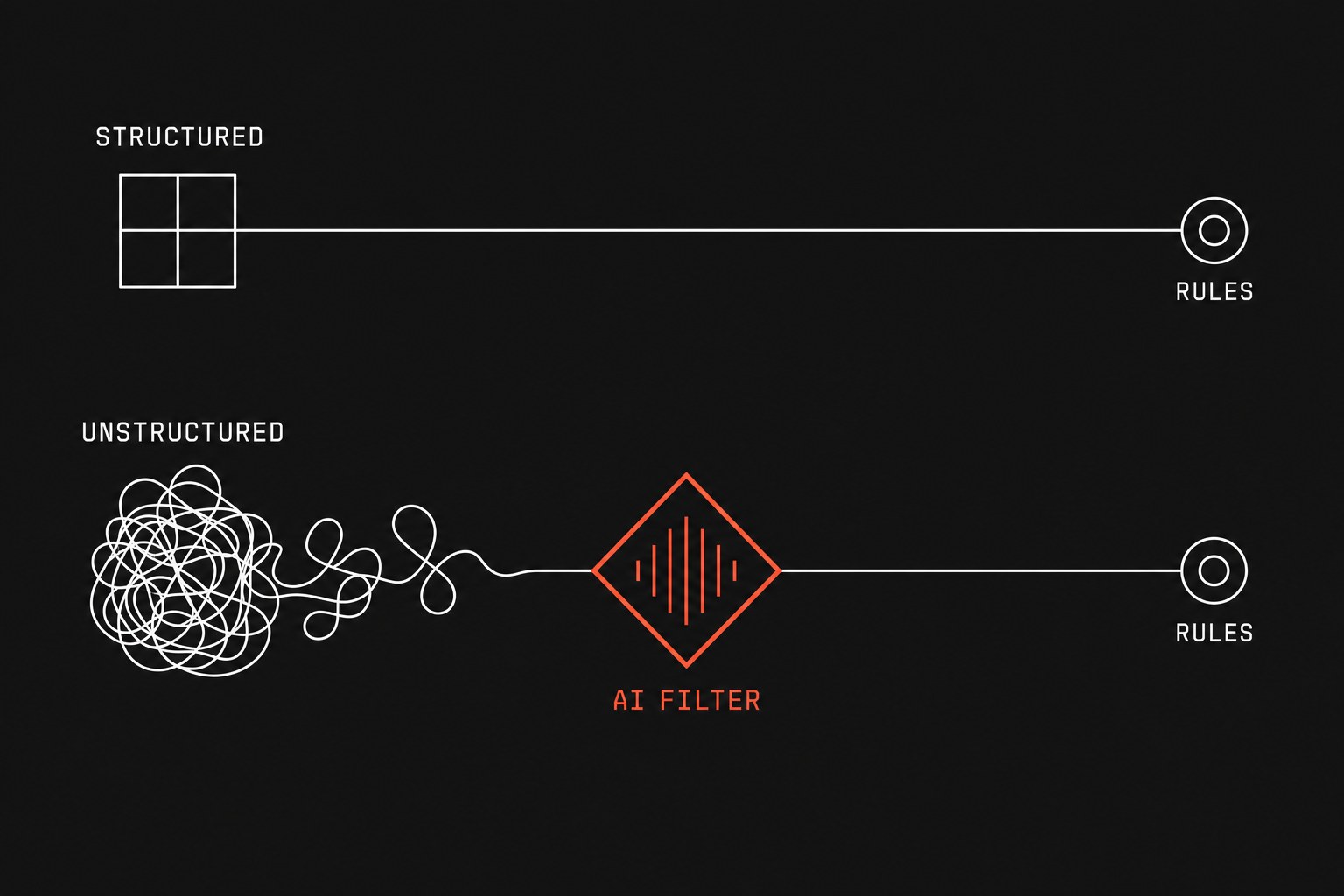
When you audit these snarls using an operational AI readiness checklist, the distinction between workflow automation and artificial intelligence becomes practical rather than theoretical. Workflow automation is deterministic, which means the exact same input produces the exact same output every single run through explicit rules. Artificial intelligence, particularly large language models, is probabilistic, meaning it computes statistical likelihoods across language tokens to guess the most plausible answer.
Confusing the two leads firms to pay for expensive language models to route structured tickets, or worse, to build brittle automation flows that choke on the first messy client email. To avoid that waste, teams must first quantify their manual operational tax and isolate where human judgment actually happens.
The mechanical differences in everyday operations
A deterministic workflow operates like a physical relay switch. When an invoice status flips to paid in Stripe, your billing software creates a receipt and sends a webhook to your accounting ledger. There is no guessing, no creative interpretation, and zero variance between transactions. Every step requires a clear handoff, which is work leaving one person or system so another can continue without manual intervention.
Probabilistic tools operate entirely on context and pattern matching. If a client sends a two-page rambling email that contains an address update, an angry complaint about scheduling, and a question regarding last month's invoice, a deterministic script will fail because the data lacks structured fields. A language model can read that messy message, summarize the core issue, extract the new street address, and determine whether the message tone warrants escalating the note to a partner.
Here is how the two approaches compare across core operational attributes:
| Operational factor | Deterministic workflow automation | Probabilistic artificial intelligence |
|---|---|---|
| Core mechanism | Explicit logic rules (if event A happens, run task B) | Pattern prediction and statistical token inference |
| Primary input type | Structured data (database rows, drop-down fields, webhooks) | Unstructured data (freeform emails, meeting recordings, PDFs) |
| Output reliability | Exact and identical every run; 100% predictable | Plausible and variable; requires guardrails and spot checks |
| Failure mode | Fails loudly with an explicit error code or broken trigger | Fails quietly by producing realistic text with incorrect facts |
| Operational maintenance | Updates needed when schemas, field names, or endpoints change | Prompts require continuous testing as models drift or update |
| Best suited for | Moving clean data between systems of record | Extracting, summarizing, or categorizing chaotic inputs |
The difference in how these systems fail matters most on a busy Thursday afternoon. When a deterministic automation breaks, it stops running and throws a red error banner, alerting you immediately to an expired credential or an altered field name. When an artificial intelligence model breaks, it fails quietly by generating a polite, confident, and completely fabricated response that slips past your filters unnoticed.
If you have ever had to troubleshoot silent automation failures in integration platforms, you know that an error notification is vastly preferable to an invisible defect that corrupts your client records for six months.
Calculating the operational triage cost
Before deciding which technology to deploy on a manual bottleneck, measure the actual hours consumed by repetitive administration versus actual reasoning. You can evaluate routing bottlenecks with a simple baseline formula:
annual routing cost
Take a service firm processing 400 inbound customer inquiries a month. If a project coordinator spends six minutes per request reviewing the email, determining which account manager owns the client, and creating a task in the project tracker, that coordinator spends 40 hours every month on clerical triage alone.
If those 400 inquiries arrive through a standard web form where clients choose their service tier from a dropdown menu, placing a language model in the middle is pure waste. A simple routing rule in your system of record, which is the official tool that is supposed to hold the truth for your client relationships, can assign the account owner instantly for zero incremental operating cost.
However, if those 400 inquiries arrive as raw emails with subject lines like "urgent question about our project" or "can someone call me," no dropdown rule can parse the intent. In that specific setting, using a language model to inspect the message text, predict the category, and draft a recommended triage assignment frees that coordinator from 40 hours of drudgery while keeping the final confirmation in human hands.
A decision framework for client handoffs
To decide whether a process needs a workflow rule, an artificial intelligence step, or human eyes, evaluate the shape of the data entering and leaving the step:
- Structured input to structured output: Use deterministic automation. When a client books a consultation via Calendly and you need a new deal stage created in HubSpot, use deterministic rules.
- Unstructured input to structured output: Use artificial intelligence to extract data, followed by deterministic automation to route it. When a signed agreement arrives as a scanned PDF and you need the renewal date written into a database, let a model parse the text, validate the date format, and trigger your standard onboarding workflow.
- Unstructured input to unstructured output: Keep a human in the loop, using artificial intelligence only to draft initial options. Drafting custom proposals, responding to escalations, or giving technical recommendations should never run on autopilot.
When not to automate with artificial intelligence
Do not introduce language models into financial calculations, payroll processing, or mandatory compliance logs. A language model does not calculate arithmetic; it predicts the characters most likely to follow an equation based on its training text. If you ask an LLM to add billable hours across three projects, it might produce the right sum nine times out of ten, but that tenth mistake will ruin your billing credibility.
Do not use artificial intelligence when the underlying business rules remain unsettled. If your partners cannot agree on which accounts receive priority scheduling or who signs off on custom scopes of work, writing a system prompt will not resolve the political dispute. You cannot automate a workflow that only exists as tribal folklore in an owner's memory.
Finally, avoid complex AI pipelines when a standard database relationship or webhook solves the bottleneck. If your team complains that they must copy customer phone numbers from your scheduling platform into your billing software, they do not need an autonomous agent; they need a stable two-way data sync.
Next step
Flaux runs an operational AI assessment that maps your team's administrative bottlenecks, separates pure workflow automations from true intelligence use cases, and gives you a clear build blueprint before you spend money on unnecessary software.