
Every automated step placed upstream of a system bottleneck simply rushes more unfinished work into a holding queue.
If you build a lightning-fast intake pipeline that collects fifty customer requests an hour while your dispatch desk can only evaluate ten, you have not accelerated service delivery. You have merely built a faster way to flood your own team.
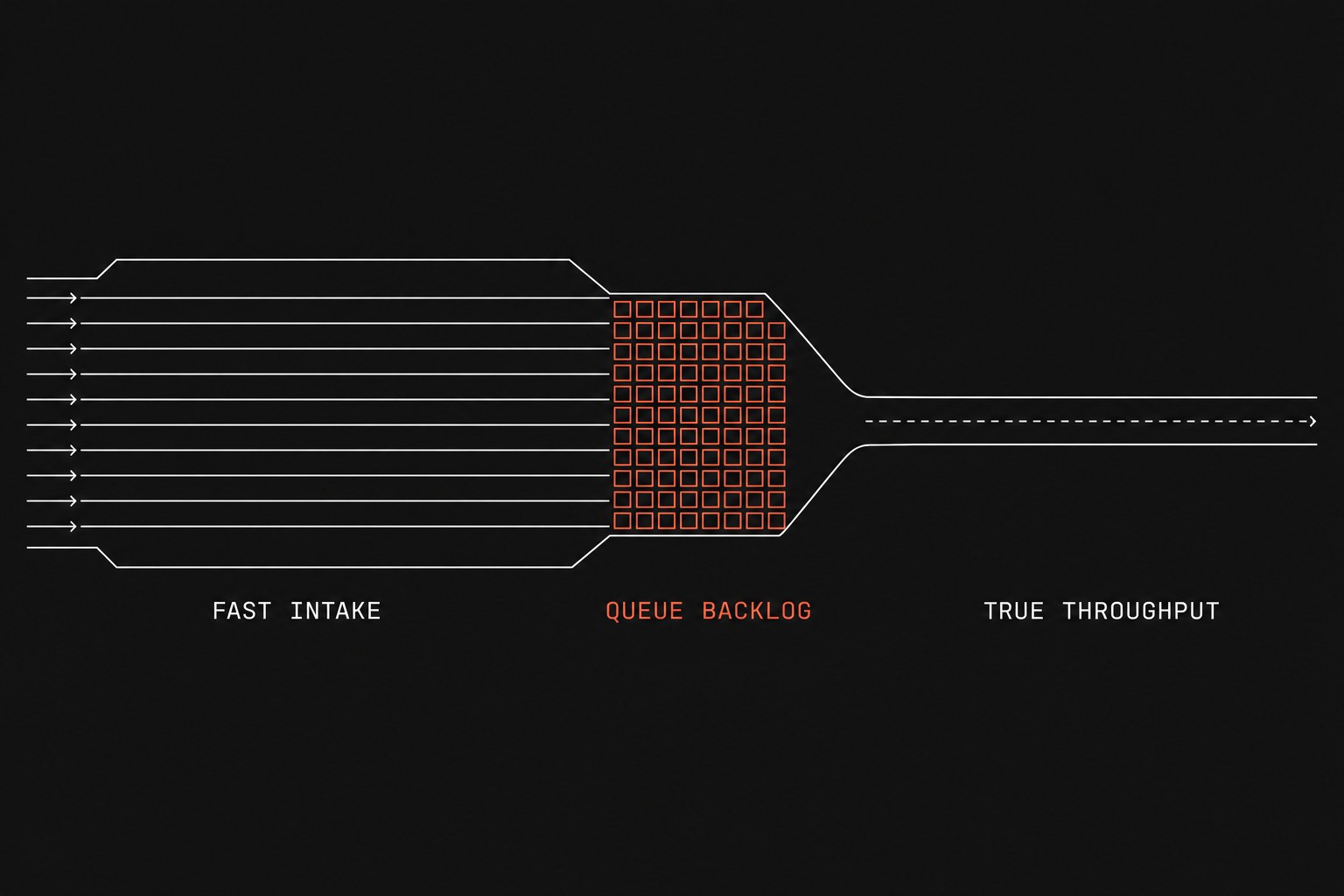
When operations leaders review processes for automation, the temptation is to pick whichever task looks easiest to script or whatever new AI interface demoed best last week. In a service company running thirty technicians or fifty project coordinators, flashy automations usually hit non-critical steps. True operational readiness starts with finding the single point of friction that dictates your business throughput. Before writing code or buying software, run through the AI readiness checklist and complete a manual work inventory to ground your decisions in actual labor hours.
Local efficiency versus system throughput
A service business is a connected chain of handoffs (work leaving one person or system so another can continue). When work stalls, it rarely stalls during active execution. It stalls in the gaps between teams where a document waits for a signature, a field note sits unread in an inbox, or a job status requires manual rekeying into your system of record (the official tool that is supposed to hold the truth).
Optimizing a non-bottleneck handoff creates the illusion of productivity while leaving total job turnaround completely unchanged. If your estimators take three days to return a proposal because they spend six hours searching for parts pricing, automating the proposal PDF generator saves thirty seconds on a step that is already waiting seventy-two hours. To pick the right candidate, you need to map where time actually disappears.
Handoff Drag = Queue Dwell Hours × Weekly Job VolumePriority Score = (Handoff Drag × Error Cost Factor) / Implementation DaysUsing this arithmetic keeps your team from spending three months building a complex automation that only saves four minutes a week.
The 4-step bottleneck mapping workshop
To run a bottleneck analysis without getting lost in hundred-page process manuals, gather your dispatchers, field managers, and billing coordinators for a ninety-minute session. Map only the primary path that turns a customer request into collected revenue.
1. Map the live handoffs
List each station a customer order passes through from initial contact to paid invoice. Record the human owner and the primary tool used at each transition.
2. Identify queue dwell time
Ask your coordinators what phrases they repeat when jobs stall. You are listening for signals like "I am waiting on the technician to email the photos" or "We cannot bill this until Sarah manually verifies the PO in the portal." The station with the largest backlog of waiting jobs is your primary constraint.
3. Audit your technical interfaces
Before committing to an automated fix, conduct a quick stack inventory to verify whether your core software allows reliable data exports or webhooks. If your field management software cannot send or receive clean status triggers, your automation will fail regardless of how well you map the workflow.
4. Score your candidates
Evaluate each candidate handoff by comparing its total weekly dwell time against its implementation difficulty and downstream risk.
| Process Step | Primary Tool | Queue Dwell Time | Weekly Errors | System Constraint? | Automation Rank |
|---|---|---|---|---|---|
| Customer Intake & Triage | Email / Web Form | 0.5 hours | Low (2%) | No | Low Priority |
| Dispatch & Schedule Matching | Service CRM | 6.5 hours | Medium (8%) | Yes | Top Candidate |
| Field Note Transcription | Notes App / Paper | 14.0 hours | High (18%) | Yes | Second Candidate |
| Invoice Generation & Review | Accounting App | 2.0 hours | Low (1%) | No | Low Priority |
When not to automate a bottleneck
Not every operational bottleneck should be solved with code or automated triggers. Automating a broken or unstable process merely creates errors at machine speed.
Do not automate the handoff if:
- The business rule changes weekly. If your dispatchers frequently adjust scheduling criteria based on unwritten judgment calls, write clear operating rules before introducing software.
- The underlying data is unvalidated. If field workers submit incomplete job numbers or misspelled customer names, fix the data validation at capture rather than building an automated parser downstream.
- The bottleneck is external. If your team is waiting on a municipal permit office or a slow third-party supplier, automated internal reminders will not speed up the vendor's processing queue.
Next step
Map the critical path across your core service workflow this week, identify the single handoff responsible for the largest queue dwell time, and focus your development efforts exclusively on that constraint. If you want an objective review of your operational constraints and software readiness, the Flaux operational AI assessment evaluates your handoffs, measures your queue times, and gives you a clear build-versus-buy roadmap.