
A software demonstration where an AI chatbot drafts a polite email reply or answers a trivia question from an uploaded PDF feels like progress, but generating text inside an isolated browser tab rarely eliminates labor from a real delivery pipeline. In a 20 to 200 person service company, labor disappears only when data moves cleanly between people and tools without manual transcription.
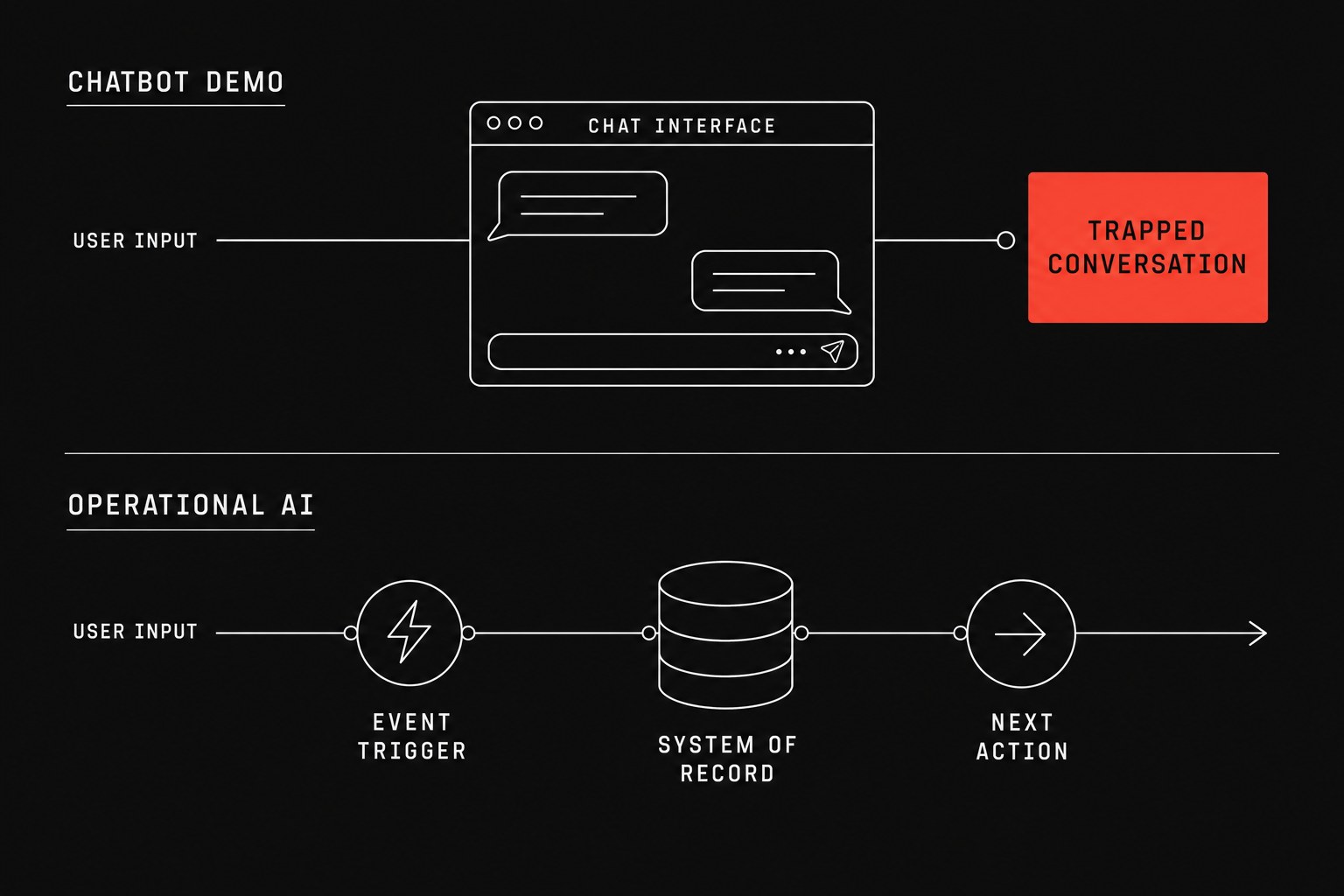
When evaluating software purchases, teams often confuse conversational interfaces with operational systems. A conversational interface takes an ad-hoc question and gives an isolated response. Operational systems monitor events, update your system of record (the official database or management software that holds operational truth), and trigger the next task without requiring a human to copy and paste text between windows. Before spending money on software licenses or custom GPT wrappers, review your team's baseline readiness with an ai readiness checklist service business and make sure you fix process before you automate.
The difference between answering questions and doing work
Most chatbot demos rely on a single user sitting in front of a prompt box typing specific questions like "What is the status of the Henderson account?" or "Draft a scope change email for project 402." The model generates plausible text, the executive observing the demo is impressed, and the sales rep marks the deal as qualified.
The breakdown happens right after the demonstration ends. If your coordinator still has to open your project tracker, locate the correct ticket, paste the generated text, review it for missing line items, and email the client manually, the labor savings is negligible. You bought an expensive text editor, not an operational solution.
| Evaluation Factor | Conversational Chatbot Demo | Operational AI System |
|---|---|---|
| Primary trigger | Human user typing into a prompt box | Event webhook, status update, or scheduled batch |
| Working context | Static document upload or vector database snapshot | Live state from your project management system or ERP |
| Action capability | Generates formatted text on screen | Creates records, updates fields, and dispatches notices |
| Handoff mechanism | Manual copy-pasting by a coordinator | Direct record creation across connected business tools |
| Human oversight | Operator must inspect and reformat every output | Operator handles exceptions only when validation fails |
| Failure outcome | Plausible hallucinations in front of client | Blocked workflow routing to an exception queue |
A handoff (work leaving one person or system so another can continue) should not require manual transcription. Operational systems handle the state transfer directly in the background.
Four questions to ask every software vendor
When a sales engineer shows you a chatbot that claims to streamline your internal delivery or customer support operations, ask these four technical questions:
- Where does the output go after the user closes the chat box? If the response sits in a transient chat session instead of updating custom fields in your project database, your team will continue doing manual double-entry.
- How does the system read live operational state? If the tool depends on periodic PDF uploads or static folder syncs, it will routinely give confident answers based on outdated project schedules.
- What is the exception path when the output is incorrect? A viable system flags low confidence scores and routes the item to an exception inbox, while a basic chat interface leaves errors for your client to discover.
- Who owns the data schema when fields change? If adding a required field to your client onboarding form breaks the underlying prompt template, your internal team will inherit maintenance headaches.
Calculating the actual labor cost of chat-based workflows
Before assuming that a chat widget will save headcount hours, calculate the total coordinator time required to operate the tool manually.
manual_coordination_cost
net_annual_savings = manual_coordination_cost - annual_software_and_maintenance_cost
If your project team handles 1,200 client status inquiries a year, and each inquiry takes 10 minutes of manual checking across tools, automating the lookup via background data synchronization saves 200 coordinator hours. If you instead provide a chatbot that requires the coordinator to prompt the bot, verify the answer against your project tracker, and paste it into an email, each query still takes 7 minutes. The net labor reduction is often smaller than the cost of the software seat licenses.
When a conversational bot is the wrong choice
Do not deploy conversational chatbots for workflows that have predictable, rule-based inputs. If client onboarding requires collecting a signed agreement, sending a payment link, and creating five subtasks in your tracking software, you need a deterministic pipeline, not a text generator.
Conversational interfaces introduce unnecessary variance into tasks that require precise execution. When a process follows standard business rules, deterministic API integrations will process the transaction faster, cheaper, and with zero hallucination risk.
Next step
If your firm is evaluating AI tools or struggling with manual data entry across disconnected software, an operational assessment identifies whether your bottlenecks require workflow automation, cleaner data handoffs, or specific tools. Flaux runs this assessment directly against your active business systems to map your operational bottlenecks and provide a clear implementation roadmap.