
Workflow automation projects usually stall because an engineering team hits an unexpected software paywall or an undocumented desktop file, not because the underlying business logic was flawed.
When operations coordinators attempt to stitch two tools together without auditing technical plumbing beforehand, they risk building fragile integrations on top of invisible manual workarounds.
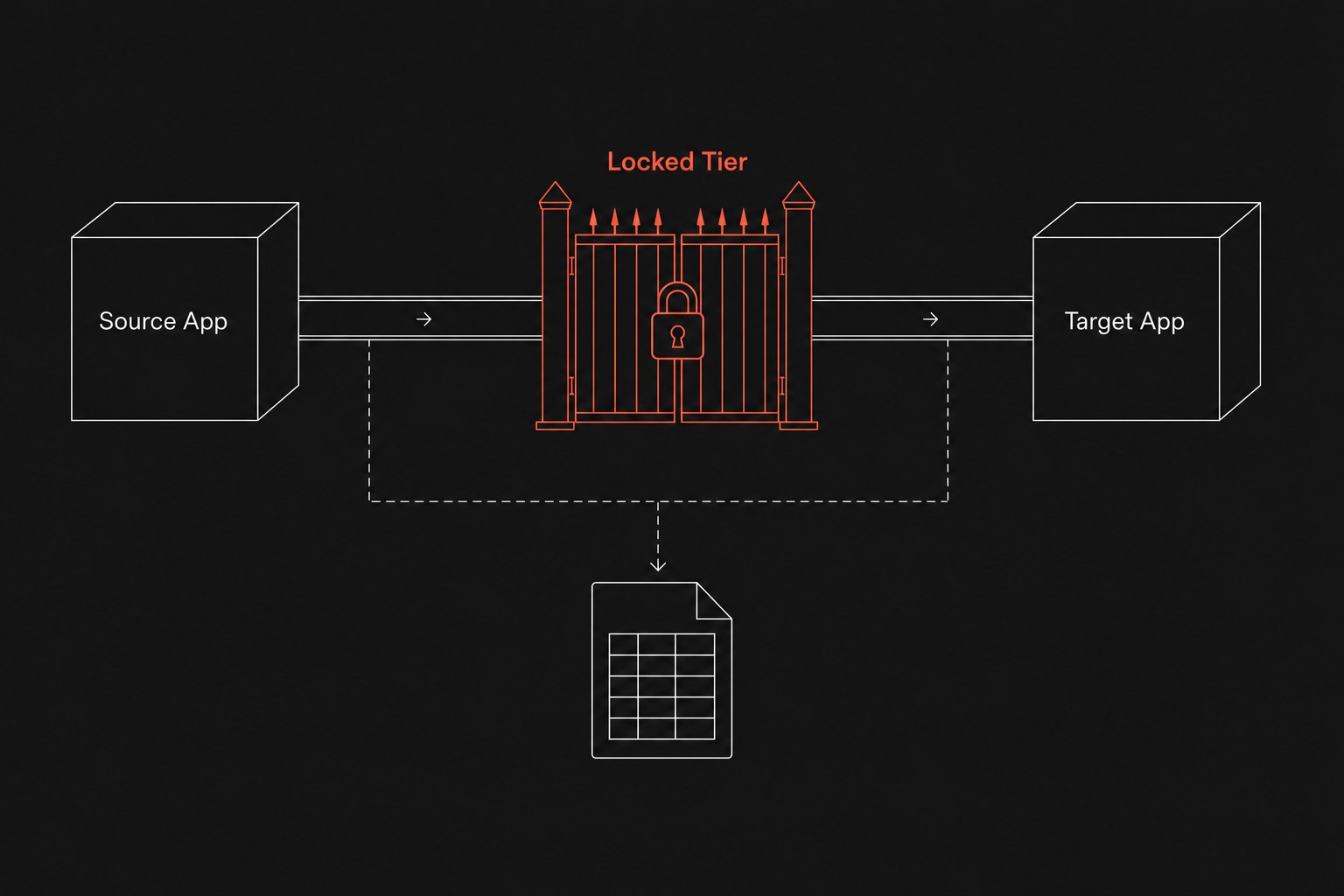
Before you schedule an engineering sprint or pay an outside developer to connect your software stack, you need an exact technical inventory of every system touched by the workflow. This audit requires moving past high-level process maps and directly testing webhook endpoints, subscription license tiers, and the quiet shadow files your team uses to get work out the door. If you already ran a manual work inventory worksheet or tried to quantify manual tax operations, this technical audit serves as the engineering filter that confirms whether your planned workflow is actually buildable.
The four layers of a pre-sprint stack inventory
Most service businesses between 20 and 200 people run on a patchwork of niche field software, accounting platforms, and spreadsheets. When coordinators notice friction, their instinct is often to say, "Let's connect our field dispatch tool directly to our CRM so records update automatically."
The difficulty is that software platforms rarely expose data in uniform ways, especially when you run into ops tools no shared events. To avoid mid-sprint surprises that drain your development budget, audit every target platform across four distinct operational layers.
1. Trigger mechanisms and event delivery
An automated workflow requires a clear trigger event to tell the system when to execute. In modern software setups, your workflow engine either receives an instant payload via an outbound webhook (an automated message sent from an application when a specific event occurs), or it must periodically query the application database through polling (asking the server every few minutes if new records exist).
You must verify whether each system supports real-time webhooks or forces your integration into polling cycles. If a software platform only supports polling, high-volume operations can quickly exhaust your monthly API call limits and introduce unwanted sync delays during busy hours.
2. Tier gating and subscription barriers
Software vendors routinely lock basic integration capabilities behind premium subscription tiers. An application might promote open connectivity on its marketing site, but when an administrator attempts to generate credentials, the settings screen presents an alert stating that API access requires an upgrade to an enterprise tier.
Before drafting integration specifications, log into your admin portal and verify whether your existing subscription includes:
- Programmatic API access for reading and writing records
- Outbound webhook configuration directly inside your administrative control panel
- Granular permission scopes that allow service accounts to edit records without full administrative rights
3. Systems of record versus shadow files
In any operating environment, a system of record = the official tool that is supposed to hold the truth, while a handoff = work leaving one person or system so another can continue. The breakdown in service operations happens when coordinators abandon the official system of record during complex client workflows because the user interface is too slow or rigid for quick adjustments.
Ask your team directly: "Which spreadsheet do you keep open on your desktop to track this job before entering it into the portal?"
If your project managers or dispatchers maintain a private tracking sheet with custom formulas, automating the official software without accounting for that side sheet will cause problems. Your automation will sync stale data while the actual job coordination continues inside untracked files.
4. Data validation and payload constraints
Automated workflows crash when an upstream source field allows unstructured free text while the destination field enforces rigid schema validation. If a team member types "ASAP" or "Next Tuesday morning" into a delivery date field, an automated sync to an accounting system that requires an ISO-standard date format will throw an error and halt execution.
You need to document the field-level constraints for every step in the pipeline:
- Required fields for record creation versus record updates
- Accepted formatting for dates, phone numbers, and currency values
- Dropdown option keys versus arbitrary text strings
- File attachment size limits and allowed file extensions
The pre-sprint stack inventory worksheet
Before committing developer hours to an integration sprint, have your operations coordinator and technical lead complete this inventory table for every software tool involved in the pipeline.
| Inventory category | Audit question | Common operational failure | Sprint pass criteria |
|---|---|---|---|
| Event Triggers | Does the source application send instant webhooks on record creation and record updates? | The system requires 15-minute polling intervals, causing race conditions between staff updates. | Webhook sends complete record payload instantly upon save. |
| Licensing Tier | Does our current subscription tier include read and write API access alongside webhook delivery? | The team builds a prototype, then discovers an unexpected upgrade fee to unlock API keys. | API keys and webhook settings are verified active in the live tenant. |
| Shadow Storage | Do team members maintain an intermediate spreadsheet or message thread during this handoff? | The automation connects two clean databases while staff continue updating their private Google Sheet. | All intermediate tracking steps are migrated into audited platform fields. |
| Data Types | Does every destination field enforce matching data formats and validation rules? | Open text notes fail to parse into structured dropdowns, causing silent workflow crashes. | Field-by-field payload mapping shows matching types and validation rules. |
| Rate Limits | How many API requests does the software vendor permit per minute, hour, or billing cycle? | End-of-month batch runs trigger rate limit throttling and drop client invoices mid-run. | Peak volume calculation does not exceed 40% of vendor rate ceilings. |
To calculate your safe operational headroom for any automated connection, run this capacity check against your platform limits:
Peak hourly transactions = Expected hourly handoffs × 3 API calls per event
Vendor hourly ceiling = Stated API limit per minute × 60
If your peak hourly transactions exceed 40% of the vendor hourly ceiling, you cannot rely on simple direct triggers without adding queuing mechanisms to buffer high-volume bursts.
When not to build an automated workflow
Running this technical inventory will sometimes prove that automating a workflow right now is an expensive mistake. You should keep the process manual under the following conditions:
- The source application lacks webhooks and restricts polling to low daily request counts, meaning time-sensitive customer updates will lag behind by several hours.
- Unlocking necessary API endpoints requires upgrading user licenses across an entire department, doubling software expenses for a modest time savings.
- The standard operating procedure changes more often than once a quarter, forcing developers to rewrite integration rules every few weeks.
- The team cannot agree on a single source of truth for customer records, leaving duplicate profiles scattered across separate databases.
When these conditions exist, building an automated pipeline only accelerates operational errors and multiplies maintenance overhead. Standardize the underlying business process and clean up your data models before investing in integration code.
Next step
Before writing custom integration scripts or committing to enterprise software upgrades, evaluate your operational bottlenecks to determine whether workflow automation, process redesign, or tool consolidation solves the root issue. Flaux runs an operational AI assessment that audits your software stack, uncovers shadow spreadsheets, and provides a clear technical roadmap before you allocate sprint resources.