
An automation that fails silently causes worse disruption than manual work because your team assumes a task was completed when nothing moved. In a service firm with thirty or eighty people, nobody spends their afternoon refreshing execution logs to verify that client files synced or invoices generated. The breakdown only surfaces when an account manager asks why an intake packet never reached a new client, forcing someone to manually audit three separate applications to discover where the data dropped.
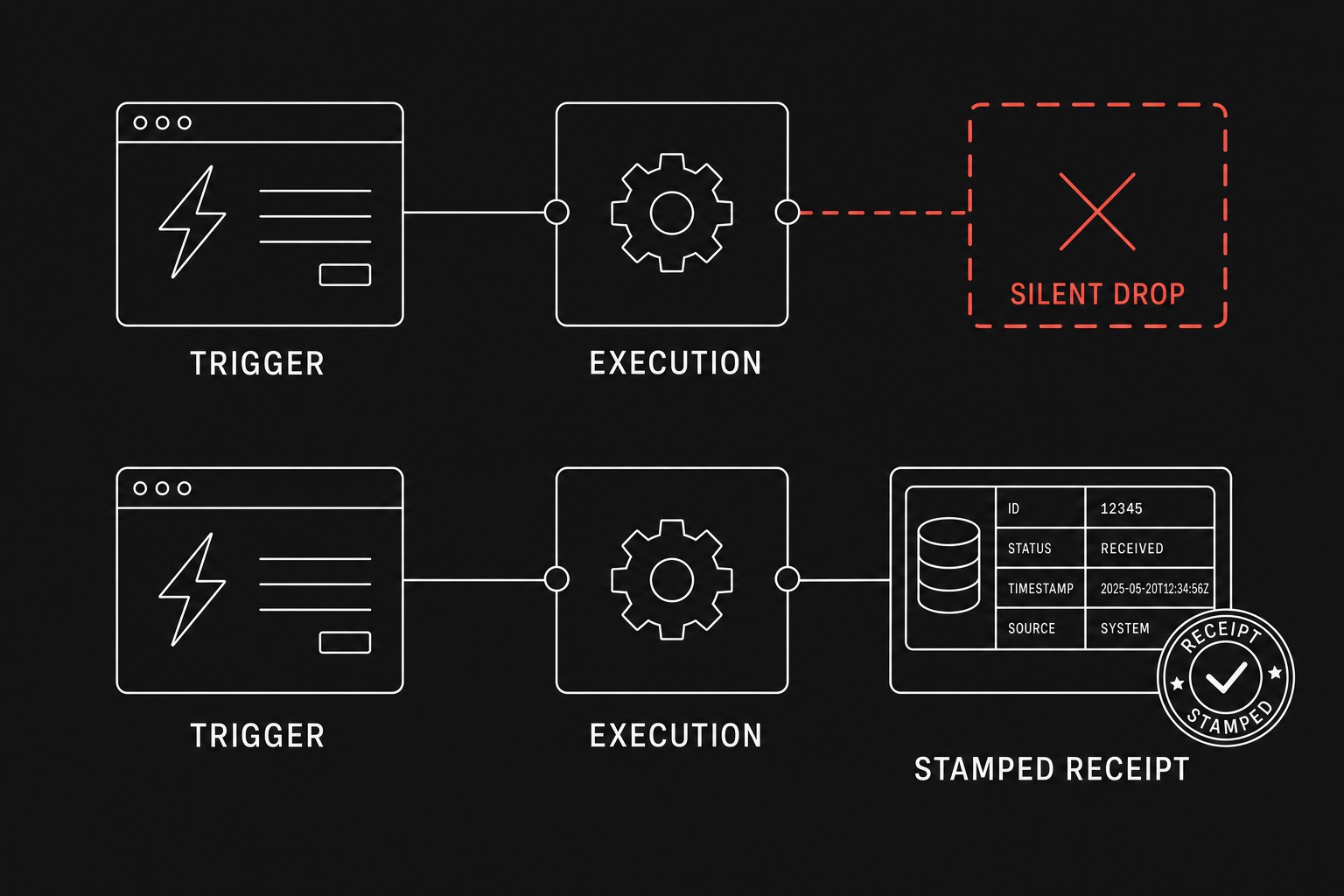
Small operations teams do not need enterprise log-streaming platforms or complex metric servers to solve this. They need a simple, durable observability pattern that makes missing executions obvious before clients notice. Understanding how to handle silent workflow failures starts with building visibility directly into your operational handoffs (handoff = work leaving one person or system so another can continue). Pairing that visibility with structured retries and alerts ensures your team spends time resolving real edge cases rather than hunting down ghost tasks.
Why standard vendor logs fail busy teams
Most automation platforms provide execution histories, but an execution history is an archive, not an alerting system. Relying on an archive forces your team into passive inspection, which breaks down the moment project volume spikes.
Platforms like Zapier or n8n default to sending failure notices to the personal email address of whoever built the integration. When that person is in meetings, out sick, or no longer with the firm, those alerts sit unread in an individual inbox while broken records accumulate in the background. Even worse, many failure modes do not trigger an explicit error status. If a third-party webhook drops out or an upstream filter drops valid records due to a malformed address string, the automation platform registers a successful execution or no execution at all.
To establish genuine operational trust, your team must distinguish between three distinct failure states:
- Hard execution errors, where an API rejected a payload or an authentication token expired mid-run.
- Silent dropped runs, where an expected scheduled trigger failed to fire or a polling trigger missed new records.
- Logical mismatches, where the automation ran completely but wrote incomplete data into the target destination.
The three-layer visibility architecture
You can secure almost any operational workflow by implementing three straightforward mechanisms: a shared error channel, affirmative success receipts, and dead-man switches.
1. Dedicated operational error routing
Never allow failure notifications to route to individual user emails. Every automated workflow must route its catch blocks and error triggers into a single, shared triage channel in your team chat tool.
When an error fires, the payload posted to the triage channel should contain four specific fields: the workflow name, the exact record identifier (such as the client name or invoice number), the specific step that halted, and a direct link to the failed execution log. This allows any coordinator on duty to claim the alert by reacting with an emoji, inspect the failed payload immediately, and re-run the transaction without guessing what broke.
2. Affirmative success receipts in the system of record
An execution log proves that a script finished, but it does not prove that your team's operational record reflects the work. Your workflows should write an explicit timestamp and status marker directly into your system of record (system of record = the official tool that is supposed to hold the truth, such as your CRM, billing software, or project database).
When an onboarding automation finishes generating a folder structure and creating a project board, it should stamp an "Automated Setup Completed" field with the current date and time on the primary client record. If a coordinator reviews an account and sees an empty timestamp three hours after a contract was signed, they know immediately that the handoff stalled. The state of the work remains visible inside the tool the team already uses every day.
3. Dead-man switches for recurring schedules
Scheduled batch automations, such as nightly time-entry syncs or weekly invoice sweeps, often fail through complete inaction rather than explicit error messages. If the scheduler itself freezes or an API connection disconnects silently, the workflow never initiates, meaning no error trigger will ever fire.
A dead-man switch solves this by expecting a recurring check-in signal. The automation ends by pinging a lightweight external monitoring URL at the end of its successful run. If that external monitor does not receive the ping within its designated window (for example, every 24 hours plus a 30-minute grace period), the monitor sends an alert to your operations channel warning that the job failed to run.
Observability patterns across automation setups
Different integration environments require slightly different methods to capture execution health. The table below outlines how to implement these layers across common operational stacks.
| Observability Requirement | Zapier Setups | Self-Hosted or Cloud n8n | Custom Webhooks & Scripts |
|---|---|---|---|
| Failure routing | Zapier Manager trigger routed to a dedicated Slack/Teams operations channel | Global Error Trigger workflow writing to a central operations channel | Structured try/catch blocks sending formatted error payloads to a chat webhook |
| Execution proof | Update record action adding a UTC run timestamp to your CRM or database | Custom node updating database status flags and logging execution IDs | Direct SQL or API update marking the row status as processed |
| Missed schedule checks | Webhook POST step at the end of the Zap hitting an external monitor ping URL | HTTP Request node hitting an external heartbeat monitor on workflow completion | HTTP GET request sent to a dead-man endpoint after script loop completion |
| Maintenance overhead | Low initial setup; requires team-level workspace permissions | Moderate setup; centralized error workflows handle all sub-flows | High setup; requires manual error handling in every custom codebase |
Step-by-step: building a basic monitoring loop
Setting up reliable observability across your core service workflows takes less than an afternoon when you follow a standard implementation checklist.
- Create a public or shared internal channel named
#ops-automation-alertsin your primary messaging tool and restrict posting permissions to webhook bots and operations coordinators. - Set up a global error catcher in your automation tool that formats the workflow name, execution link, and customer identifier into a standardized message template.
- Add a completion step to your highest-volume workflow that updates a custom date field named
Last Automation Runon the primary database object. - Set up an external heartbeat monitor for any workflow running on a cron schedule, setting the alert threshold to run time plus thirty minutes.
- Define a clear team protocol for alert triage: the first coordinator to investigate marks the notification with an eye emoji, then adds a checkmark once the record is reprocessed.
Calculating the operational cost of silent downtime
To understand whether investing time in monitoring infrastructure makes sense for your team, compare the manual labor spent investigating unannounced failures against the setup effort.
Calculate the weekly cost of silent failures using this formula:
Weekly failure tax
For a fifty-person agency experiencing three untracked workflow breaks a week:
Weekly failure tax
Over a year, that represents more than $17,500 in lost coordinator capacity spent answering questions like "Did the client get the intake form?" or manually reconstructing lost form submissions.
When not to build complex monitoring
Do not build heartbeat monitors or affirmative database receipts for low-stakes, non-blocking convenience automations. If an automation merely sends an informal Slack notification when an employee posts a link in a general channel, an unhandled failure carries zero financial or client impact. Adding multi-step monitoring or database updates to simple notification pipes introduces unnecessary maintenance and clutters your alerts. Reserve affirmative receipts and dead-man switches for workflows that move client deliverables, generate financial billing records, or pass critical handoffs between departments.
Next step
If your service firm is losing hours each week chasing missing intake records or untangling silent Zap failures, Flaux can map your handoffs and implement durable automation workflows with built-in visibility and shared error routing.